Large-screen coaching for offices, labs, classrooms, remote support, and fixed workstations.
AVAILABLE MVPUse the main button for the full software, or open the Phone / Tablet App below. Tap Login / Open Full Software above to sign in and use AI Work Coach on your phone, tablet, or computer.
START WITH THREE FREE AI REQUESTS
Use procedure checklists, camera or screen preview, spoken steps, and saved progress. Sign in to use AI text guidance or submit a snapshot. Free accounts include three lifetime AI requests shared across chat and image analysis. Videos show the product vision.
Open the full software →YOUR AI GUIDE FOR REAL-WORLD WORK
SEE IT.
LEARN IT.
DO IT BETTER.
AI Work Coach watches the task, understands the process, and guides you step by step—while you work.
G1
Built for people who build.
Trades • Teams • Training

REAL-TIME WORK GUIDANCE
WATCH THE TUTORIAL DEMOTap the sound control to hear the video
REAL-TIME
VISUAL COACHING
STEP-BY-STEP
WORK GUIDANCE
SMARTER
SKILL DEVELOPMENT
SAFER
WORKFLOWS
ONE COACH · EVERY SCREEN
Use it on the device
already in your hands.
Start with the technology you already own. AI Work Coach is designed for computers and mobile devices today, with hands-free wearable support as the next expansion.
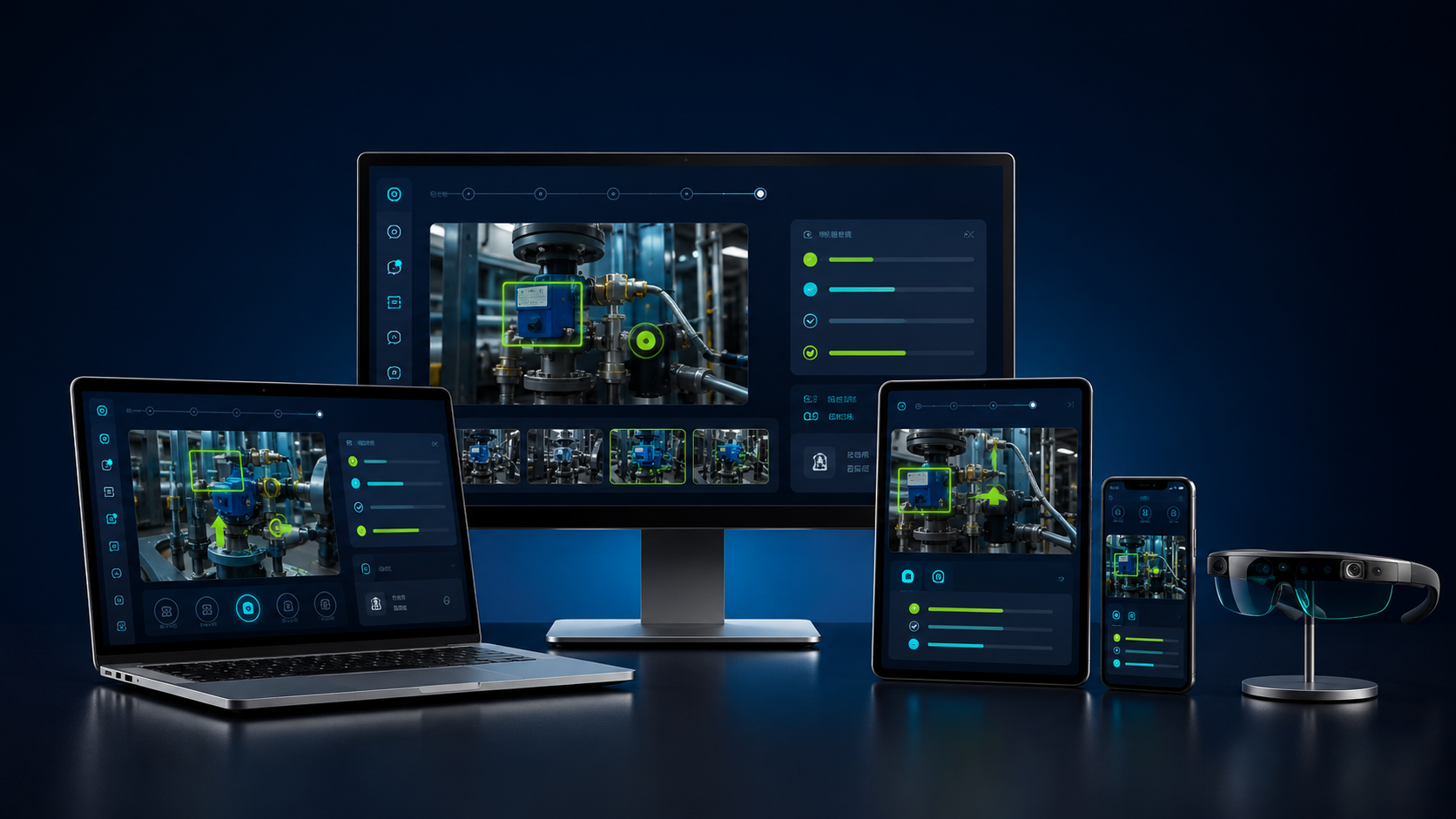
Portable training and camera-assisted guidance at school, on site, or at a workbench.
AVAILABLE MVPHands-on visual instructions with a larger mobile view for field and team environments.
WEB APP READYUse the phone camera to show the task and follow guidance from almost anywhere.
WEB APP READYFuture hands-free coaching that keeps instructions visible while the worker uses both hands.
PLANNED EXPANSIONNO SPECIAL HARDWARE REQUIRED TO START. Open the AI Work Coach web app on a device with a modern browser and camera. Smart-glasses integration comes after the core coaching system.
PHYSICAL WORK + DIGITAL WORK
One coach for almost anything you need to learn or complete.
Share the camera for real-world jobs or share your screen for computer work. AI Work Coach can guide a person through tools, software, procedures, and new skills one step at a time.
Plan pages, write content, choose layouts, connect forms, publish updates, and fix common website problems.
SCREEN COACHINGUnderstand code, follow development steps, debug errors, build small apps, and practice new programming skills.
SCREEN COACHINGLearn chart terminology, order types, position sizing, and paper-trading journals. Understand risk before using real money.
TRADING EDUCATIONLearn crypto market basics, chart reading, wallet security, fees, and paper-trading practice. Never share wallet keys or recovery phrases.
TRADING EDUCATIONLearn formulas, organize data, build tables, create charts, clean spreadsheets, and complete office assignments.
SCREEN COACHINGWrite stronger prompts, create documents and media, automate repeated work, and learn new AI applications.
SCREEN COACHINGGuide students through lessons, labs, career programs, simulations, and hands-on technical education.
LEARNING MODESupport plumbing, electrical, HVAC, welding, automotive, maintenance, installation, and inspection workflows.
CAMERA COACHINGTeach software, reports, presentations, customer service processes, onboarding, and administrative tasks.
SCREEN COACHINGReinforce approved procedures, equipment setup, checklists, documentation, and simulation-based practice.
GUIDED CHECKLISTSGuide receiving, equipment checks, assembly steps, quality control, inventory, and safety procedures.
CAMERA COACHINGGet help with DIY projects, device setup, cooking processes, home maintenance, and learning new tools.
PERSONAL COACHINGLearn design software, video editing, content creation, writing workflows, and digital publishing.
SCREEN COACHINGTurn an organization's own manuals, standards, and procedures into repeatable guided work sessions.
CUSTOM TRAININGHOW IT WORKS
A coach that works
alongside you.
Turn complex work into clear, guided action. No thick manuals. No guessing. Just the right instruction at the right moment.
◎
See the task
Use your camera or share your screen. AI Work Coach understands the job in front of you.
↗
Get clear guidance
Receive visual steps, spoken instructions, safety reminders, and real-time corrections.
⌁
Improve every shift
Track completed tasks, build confidence, and shorten training time without slowing the work down.
QUICK PRODUCT DEMO
See exactly how
a worker uses it.
The first working version can begin with a phone, tablet, or computer camera. The worker shows the task, receives the next instruction, confirms completion, and continues. Smart-glasses support can be added after the core coaching system is working.
START HERECamera + AI guidance + step confirmation
ADD NEXTCompany procedures + progress tracking
EXPAND LATERWearable glasses + advanced integrations
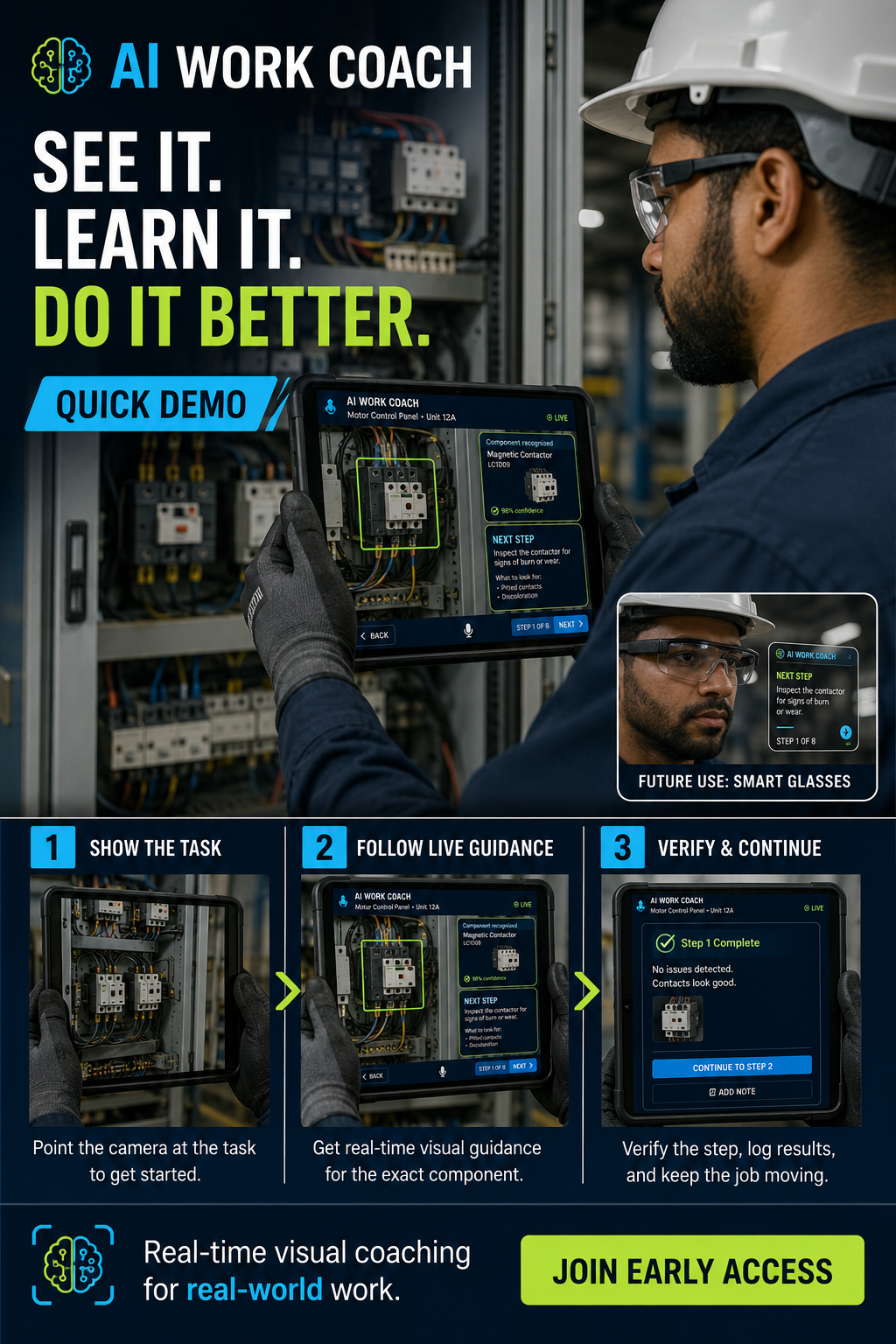
SMART GLASSES IN ACTION
See more ways
to work smarter.
Watch AI Work Coach support different real-world tasks through hands-free smart glasses—bringing timely guidance directly into the worker's view.
MULTI-SCENARIO DEMO
OFFICIAL AI WORK COACH COMMERCIAL
The future of training
is already at work.
See the vision for real-time AI guidance that helps people learn faster, work with confidence, and complete tasks step by step.
OFFICIAL COMMERCIAL
INSIDE EVERY SESSION
From camera view
to confident action.
AI Work Coach is designed to turn what the worker sees into useful, job-specific support—without forcing them to stop working and search through manuals.
Understand the task
The worker points a phone, computer camera, or future wearable at the work area. The coach identifies relevant equipment, tools, parts, and the current stage of the job.
Deliver the next step
Instructions appear as short visual prompts and spoken guidance. The worker receives the right information at the moment it is useful—not an entire manual at once.
Check safety and quality
The coach can surface required precautions, checkpoints, and procedure reminders before the worker advances to a risky or quality-critical step.
Verify and improve
Completed steps can be confirmed, progress can be recorded, and supervisors can use the results to identify training needs and improve repeatable workflows.
FOR WORKERSLess guessing · Faster learning · More confidence
FOR EMPLOYERSConsistent training · Fewer avoidable errors · Faster onboarding
FOR TRAINERSReusable knowledge · Guided practice · Clear progress
MADE FOR EVERYDAY EXPERTS
Every job gets
a smarter coach.
If a job has steps, tools, standards, software, or safety checks, AI Work Coach can help someone learn it faster and perform it with more confidence.



BUILD & REPAIR
Electricians · Plumbers · HVAC techs · Welders · Carpenters · Roofers · Mechanics · Machinists
HEALTH & CARE
Nurses · Medical assistants · Dental teams · Home-care workers · Pharmacy techs · Lab techs
MAKE & MOVE
Factory teams · Warehouse associates · Drivers · Forklift operators · Quality inspectors · Logistics teams
SERVE & SUPPORT
Chefs · Hotel teams · Cleaners · Barbers · Retail associates · Property maintenance · Security
OFFICE & DIGITAL
Administrators · Sales teams · Designers · Coders · Accountants · Customer support · Remote workers
FIELD & FUTURE
Farmers · Solar installers · Utility crews · Telecom techs · Drone operators · Wind technicians
LEARN & TRAIN
Students · Apprentices · Teachers · Corporate trainers · DIY learners · Career changers
PUBLIC SERVICE
Municipal crews · Transit teams · Inspectors · First-responder training · Facilities teams
AND THAT'S ONLY THE START. The coach can be configured around the procedures, equipment, knowledge, and quality standards of almost any role.
BUILT FOR REAL WORK
One coach.
Every skill.
From a first-day trainee to an experienced technician learning a new system, AI Work Coach adapts the guidance to the worker and the job.
01Skilled trades↗
02Manufacturing↗
03Field service↗
04Warehouse teams↗
05Technical training↗
06DIY projects↗
SIMPLE PRICING
Choose the coach
that fits your goals.
Start with three lifetime AI requests, then choose a monthly subscription or 12 months prepaid. Sign in to view checkout and confirm your plan before paying.
FREE
$0
Try AI guidance and the workspace before upgrading.
- Three lifetime AI requests
- Procedure checklists
- Camera and screen preview
- No credit card required
AI WORK COACH
$49/month
For ongoing learning, projects, and career growth.
- AI text and snapshot guidance
- Progress tracking
- Camera and screen guidance
- Step-by-step voice support
- 100 AI requests each calendar month
AI WORK COACH PRO
$99/month
Everything in AI Work Coach, plus more power for professionals.
- Everything in AI Work Coach
- 200 AI requests each calendar month
- AI text and snapshot guidance
- Procedure checklists and saved progress
- Email support
SCHOOLS • BUSINESSES • GOVERNMENT
Custom
Pricing
Pricing
Flexible plans for organizations and workforce programs.
- Volume licensing
- Organization reporting
- Custom training programs
- Team and student access
- Custom support and contracts
PAY ONCE · SAVE FOR THE YEAR
Prepay for 12 months.
One upfront payment with no automatic renewal. Choose a plan and sign in to view payment options.
Standard prepaid
$499 / 12 months
Save $89 compared with 12 monthly payments.
100 AI requests each calendar month.
Pro prepaid
$999 / 12 months
Save $189 compared with 12 monthly payments.
200 AI requests each calendar month.
Sign in to your AI Work Coach account to check prepaid checkout availability. Access activates only after payment is confirmed. Prices are in U.S. dollars. Taxes may apply.
MONTHLY SUBSCRIPTIONS: Cancel anytime. Prices are in U.S. dollars. Taxes may apply.
Organization plans are quoted based on users, training needs, and support requirements.
WORK SMARTER FROM DAY ONE
Ready to put an AI coach
on your team?
Open the online workspace, sign in, and start with your free AI allowance.
Open AI Work Coach ↗TRUST & POLICIES
Clear terms.
Responsible AI.
These summaries explain how AI Work Coach handles access, billing, information, and responsible use. Contact support with questions before subscribing or sharing sensitive information.
Privacy & Data Notice
AI Work Coach uses information you provide to deliver coaching, maintain your account, track plan usage, improve service quality, prevent misuse, and meet legal obligations. Camera, screen, image, and voice inputs are processed only when you choose to share them. Do not submit confidential, regulated, or personally sensitive information unless your organization has approved its use.
Terms of Service
You are responsible for using the service lawfully, following workplace rules, reviewing important instructions, and maintaining safe working practices. Access may be limited or suspended for misuse, security threats, unlawful activity, or attempts to disrupt the service.
Subscriptions, Billing & Cancellation
Recurring subscriptions renew at the interval shown at checkout until canceled. Annual prepaid access is a single payment for 12 months and does not automatically renew. AI usage limits reset each calendar month; annual payment does not make usage unlimited. To request cancellation or billing help, email proaccount33@gmail.com before your next renewal. Payment confirmation is required before paid access activates. Taxes may apply. Organization plans follow their signed agreement.
Refund Policy
Subscription charges are generally non-refundable after a billing period begins, except where required by law or stated in a signed agreement. For an incorrect charge, duplicate payment, or annual prepaid refund request, email proaccount33@gmail.com promptly with your account email and payment date. Do not send card details. Requests are reviewed individually; applicable consumer rights are unaffected.
Acceptable Use
Do not use AI Work Coach for illegal activity, harassment, harmful surveillance, unauthorized access, dangerous conduct, or to bypass safety rules. Users must follow applicable laws, employer procedures, equipment instructions, and professional requirements.
AI Guidance & Limitations
AI Work Coach™ is designed to provide helpful, relevant, and accurate guidance based on the information available at the time of use. Because artificial intelligence may occasionally interpret information differently or produce incomplete results, users should review important instructions and verify high-impact decisions when appropriate.
Camera, Screen & Image Consent
Camera, screen, microphone, and image features activate only after user action and device permission. By sharing content, you confirm that you have permission to capture the people, property, systems, and information shown. You can stop sharing through your device or browser controls.
Schools, Minors & Organizations
School, government, and business use requires an approved organization plan and appropriate agreements. Children should not create accounts or submit personal information without authorization from a parent, guardian, school, or other responsible organization. Institutions remain responsible for applicable FERPA, COPPA, privacy, accessibility, and record-retention obligations.